Onboarding
| Prerequisites | a laptop with uv, git, make, and the orq.ai CLI |
| You will have | a working gateway request using the workshop key, plus its trace in Studio |
Why
Every model call today, yours and the agent's, goes through the orq.ai AI Gateway: one OpenAI-compatible endpoint in front of every model the workspace has enabled. One key, one base URL, and each call becomes a trace with its cost, tokens and latency. Before anything else, check that this works with your key.
Steps
Step 1 · Get your key
- Scan the QR code on the slide, or open the kickstart page the hosts show.
- Enter your email and the passcode on the slide.
- Open the email. It holds a ready-to-paste block:
ORQ_API_KEY,ORQ_PROJECT,WS_PREFIXandORQ_WORKSPACE.
Step 2 · Clone and configure
git clone https://github.com/orq-ai/kickstarterai-techdays-workshop-2026
cd kickstarterai-techdays-workshop-2026

uv sync --all-groups                   # install dependencies
test -f .env || cp .env.example .env   # create your config on a fresh clone
make setup does both of these.
Paste the block from the email over the empty lines at the top of .env. The model lines below them are already filled in; leave them.
In every new terminal, load .env so orq and curl can read it (Python scripts load it themselves):
Install the orq.ai CLI if orq --version says command not found. Skip the installer's login step: the workshop uses your key from .env, not a saved session.
curl -fsSL https://cli.orq.ai/install.sh | sh -s -- --no-setup
# or, with Node 14+ (the only route on Windows):
npm install -g @orq-ai/cli
If orq is still not found after the installer, it landed in ~/.orq/bin: add that folder to your PATH or open a new terminal.
Check that the CLI uses your workshop key:
Look for source: ORQ_API_KEY. If you see another source (such as a saved orq auth login session) or an error, run make orq-doctor: it runs orq whoami and orq doctor with .env exported.
Step 3 · Make one gateway request
A model ID has the form provider/model. This script makes one OpenAI-compatible Responses API call with the MODEL from your .env and prints its trace ID:
make gateway-check does the same. Look for verdict : OK and save the trace ID.
Example output (your model, answer, tokens and trace ID can differ):
endpoint : https://my.orq.ai/v3/router/responses
model : wafer/GLM-5.3-Flash
answer : An AI gateway sits between applications and AI models
to manage and secure requests, ...
tokens : 17 in, 48 out
trace : 74c18139baffe8399c6029823b037995
verdict : OK, your key and the gateway work
Step 4 · Find that trace
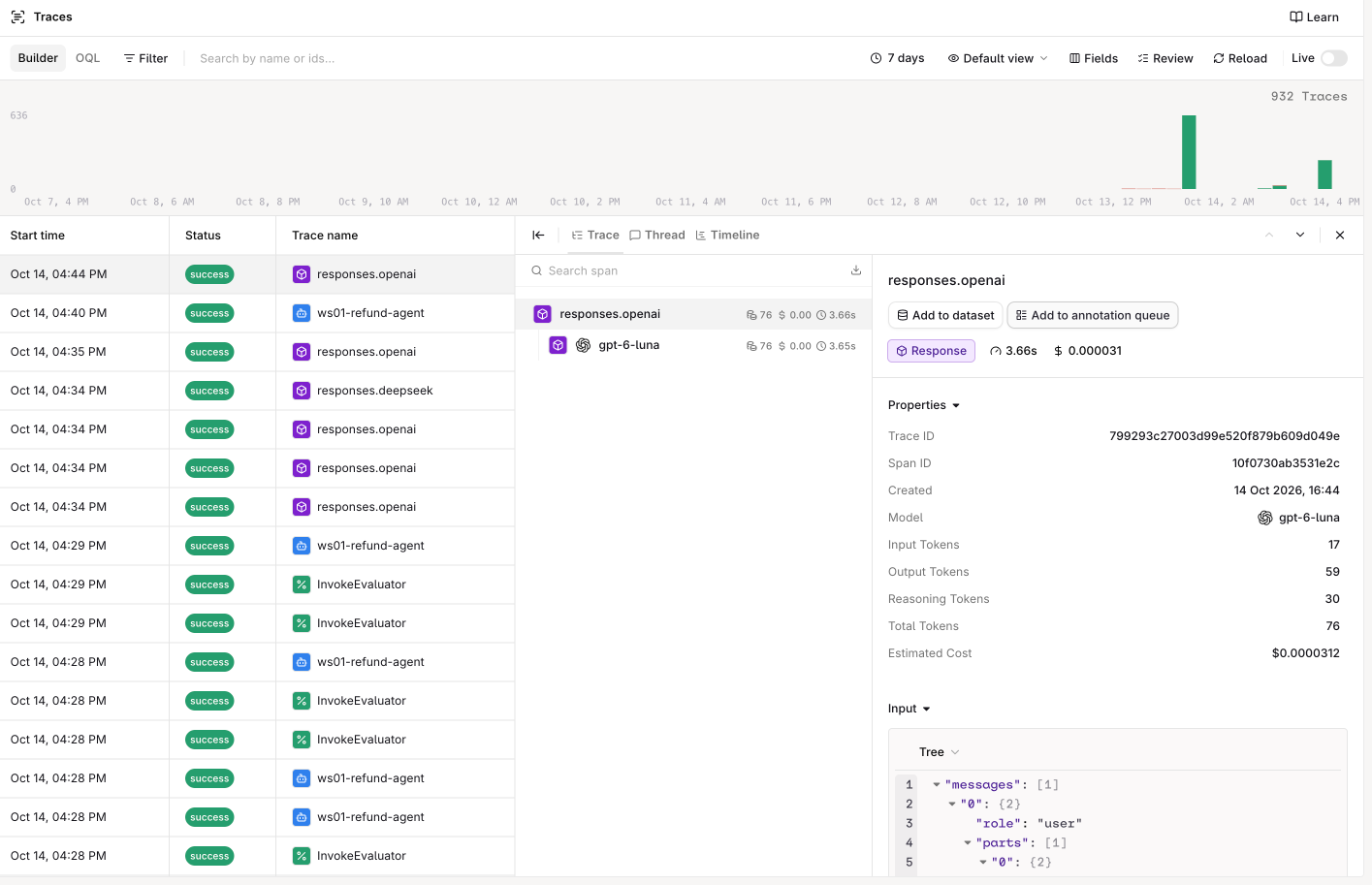
Open the workshop workspace, select the project named by ORQ_PROJECT in your email, then open Observability > Traces and find the ID from Step 3. Check the model, response, tokens, cost, and latency. That is the same evidence you will later use to inspect an agent turn.
Optional · Browse models and try other interfaces
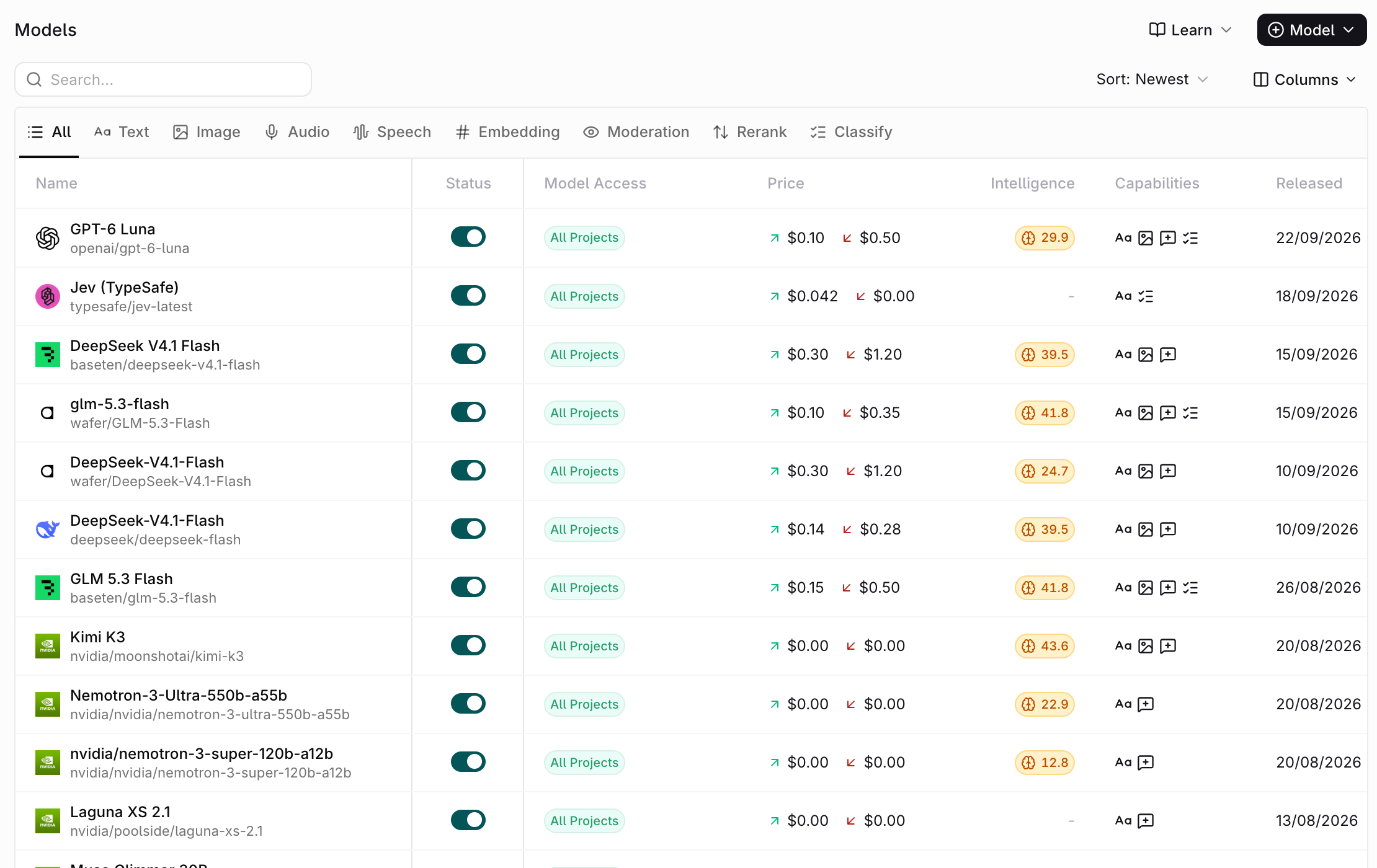
In AI Gateway > Models, the Model Garden lists the models available to this workspace. The model ID in .env is your starting point; the provider, capabilities, and price help you choose another. Comparing models is useful, but not required before creating the agent.
The same list from the terminal (requires jq):
orq models list -o json |
  jq -r '
    .[]
    | select(.enabled)
    | "\(.provider)/\(.model_id)  \(.model_type)"
  '
The same request, three ways. Pick one or skip them; the script above already made it.
from openai import OpenAI

from app.refund_agent.config import settings  # loads .env

client = OpenAI(api_key=settings.api_key, base_url=settings.router_url)
raw = client.responses.with_raw_response.create(
    model=settings.model,
    input="In one sentence: what does an AI gateway do?",
)
print(raw.parse().output_text)
print(raw.headers.get("x-orq-trace-id"))
Optional · Compare another model
Pick another chat model from the Model Garden and send the same request; only the model id changes:
Compare the two trace IDs in Observability > Traces. The model, tokens, cost, and latency will differ.
Gotchas
- 401 API key is not valid. The key in
.envhas a typo or a trailing space, or your shell exports an olderORQ_API_KEY. Paste the block again, then rerun the environment command from Step 2 before using curl or the CLI. - 400 invalid model. The model id has no provider, or is not enabled in the workspace. Copy it from the Model Garden as
provider/model.
Official docs
- AI Gateway: one endpoint in front of every model
- Models (Model Garden): browse and enable models,
provider/modelids - OpenAI-compatible API: the OpenAI SDK with orq.ai's base URL
- Responses API: the endpoint every call today uses
- API keys: project-scoped keys, like the one in your email
- Traces: what each call records
- orq.ai CLI:
orq whoami,orq models,orq responses
Done when
uv run python -m app.gateway_check prints a trace id and verdict : OK, and you have found that trace in the Studio.